The timing is right if you're looking to try out Mint. New improved "Zena" is here – still based on Ubuntu Noble, but now with Cinnamon 6.6 and improved Wayland support, plus better internationalization, new System Information and System Administration tools, and clearer icons.
The latest Mint – 22.3 – was officially released on Tuesday. Downloads were available a few days before the announcement, but we thought it was better to wait until it was official. All three editions of Linux Mint – Cinnamon, MATE, and Xfce – have been updated. The project used to publish separate announcements, "What's new", and release notes documents for each edition; for Mint 21.2 we resorted to a table to include all 12 links. No more. Now, there's one unified New Features page and a single all-embracing set of Release Notes.
Linux Mint releases track long-term support (LTS) releases of Ubuntu, Mint's upstream distribution. Mint 22.0 arrived in July 2024, based on Ubuntu 24.04 "Noble Numbat", which was released in late April after a belated beta release.
Zena showing Cinnamon 6.6 with its revamped App Menu, and the new System Information app
Canonical puts out semi-annual point releases for each LTS release of Ubuntu, each with an updated kernel and display drivers from the corresponding interim release. As we mentioned when we looked at Mint 22, for this release cycle, the project slightly changed how its point releases work: point releases since 22.0 now track the newer kernels and display drivers included in the point releases of Ubuntu. This also means no more Linux Mint EDGE releases. So, Mint 22.3 is based on Ubuntu 24.04.3, complete with kernel 6.14 from Ubuntu 25.04 "Plucky Puffin.
Aside from the less-visible under-the-hood updates, there are some new features that affect Cinnamon, MATE, and Xfce. The old System Reports tool has new pages to report info about USB devices, GPUs, PCI devices, and the system firmware; to reflect this, it's been renamed System Information. There's also a new app which looks very similar – but as it requires root privileges, it's been turned into a separate tool called System Administration. For now, this only has one page, which lets you adjust various aspects of the bootloader config and menu via an easy GUI. This is a welcome change, as it's an aspect almost all other distros completely ignore. There's also a new applet for managing Thunderbolt devices. We have reported before on the incompatibilities between Thunderbolt 4 and older versions, and even a simple app which can tell you what the computer can see and identify is very helpful – and missing from some distros and desktops.
As with MATE, 'Zena' still uses Ubuntu Noble's old Xfce. Why no Nemo here?
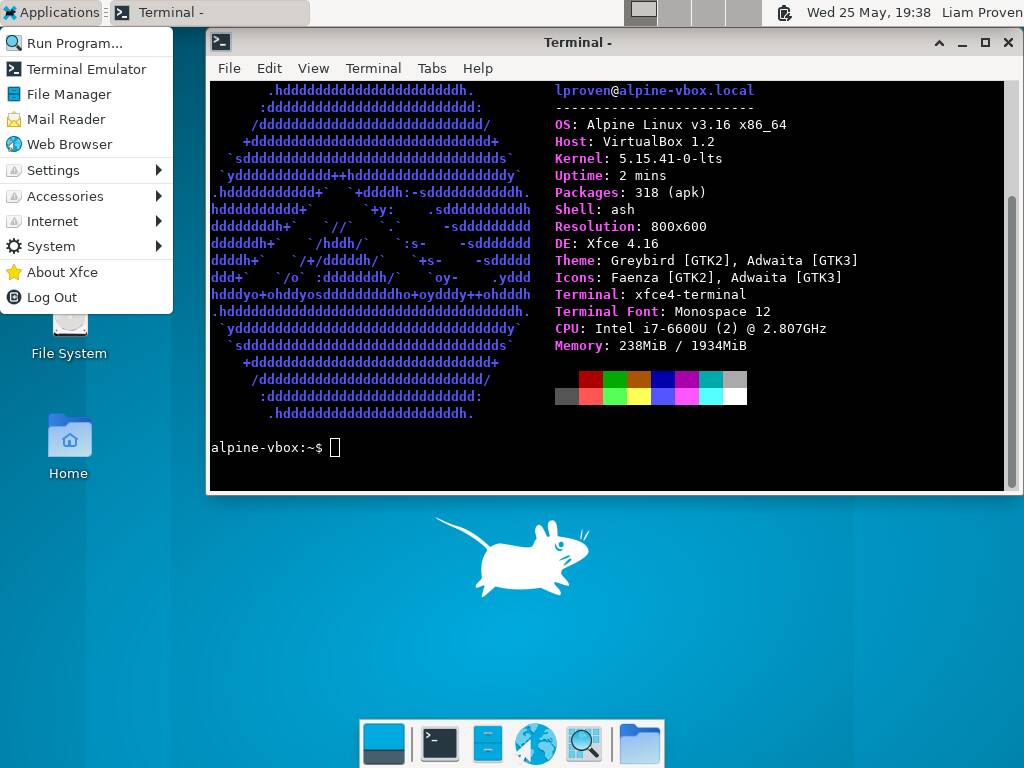
A system-wide change is a set of new monochrome icons called the XApp Symbolic Icons. This is because the GNOME project has removed from its Adwaita theme some icons no longer used in the GNOME desktop – but Mint used them, and that caused problems. Mint isn't the only distro to suffer from disappearing icons that were in Adwaita – we saw problems in Alpine Linux 3.16, as you can see in our screenshot, which the distro's creator ascribed to Adwaita changes in the article's comments.
It's not the first time that the Mint project has suffered from issues created by GNOME's stance of ignoring interoperability problems with other desktops. In 2022, we reported that Mint had to create the new Blueman Bluetooth-management tool, because of changes in GNOME's version. We also reported that year on the issues around GNOME's Adwaita theme. A couple of years later, we reported that Mint ended up forking Adwaita and libadwaita, but it seems that problems remain. We find it ironic that GNOME's changes often break other desktops, given the plea of GNOME developers a few years ago: Please don't theme our apps because it "can make applications look broken, and even unusable."
Some of Mint's other applications and accessories got tweaks, too. The Timeshift app for making and restoring system snapshot can now pause and resume operations, and the Mint Backup app has an option to show hidden files – and include them in backups. The cross-platform file-transfer app Warpinator now supports IPv6 and can send text messages to other users. The Hypnotix IPTV app hides the mouse pointer when playing full-screen. Mint's Update Manager applet shows an indicator if you'll need to reboot. Nothing shattering, but all welcome.
However, as is usually the case with Mint point-releases, the main changes are to the flagship Cinnamon edition. "Zena" comes with the brand new Cinnamon version 6.6.4.
There are lots of large and small features in the new desktop. The main menu is quite a bit more customizable, and its sidebar has several new display modes rather than the single column of icons it had before. You can customize the sidebar, show text labels, or hide it altogether; it's possible to move sections of the menu around, and choose what entries appear on the main menu, and it has improved keyboard controls. The taskbar can show badge on app icons, so you can see how many pending notifications, such as unread emails, there are. The virtual-desktop switcher has a simpler, clearer display. The app-switcher can opptinally be limited to the currently visible desktop, and you in the fractional scaling options, choose whether it scales up or scales down. There are also refinements to window and theme management, hot corners, the night-light function, and more.
A section that's had major attention is internationalization (or "i18n" for short). To those of us who just work in English, this is easily overlooked. For instance, the long-lived Windows 10 IoT LTSC edition only works in US English, which is acceptable enough for the Reg FOSS desk, who is a Hiberno-Brit.
Cinnamon's support for operating via Wayland is still being worked on, and until now, previous versions only supported the US English keyboard layout when using Wayland. This is a fairly serious gap in i18n support, but we must confess: we never even noticed. Now, this area is getting some proper attention. For instance, there's much richer keyboard localization support. Cinnamon understands combinations of alphabet layout, regional character set, and additional input methods – the helper apps for languages which need more symbols than the plain old QWERTY (or QWERTZ, or AZERTY) layout provides, including Chinese, Japanese, Korean, Arabic, the various forms of Cyrillic, and so on. There's a new on-screen keyboard, layout switching tools, and more.
Cinnamon's Nemo file manager has been updated, too. File copy and move operations can be paused and resumed, there's a templates manager, search using wildcards or regular expressions. There's better thumbnailing and the handy split-screen mode is easier to find.
Nemo is a great file manager, and some other distros use it in place of GNOME's original Nautilus, which has had many of its features stripped out for simplicity. For instance, Ubuntu Unity uses Nemo. Given the development effort that Mint puts into Nemo, we find it a little strange that the other Mint desktops don't use Nemo as well, but no: Mint Xfce uses the default Thunar, and Mint MATE uses Caja.
Graphical boot admin is good, but 'Zena' still comes with the same dated MATE
The Linux Mint project has come a long way since its 2006 origins, when it was basically Kubuntu with added drivers and codecs. When Canonical switched Ubuntu's default desktop to Unity in 2011, many people found the new Mac-like desktop strange and unfamiliar. Mint offered a Windows-like alternative on the solid Ubuntu base, and it thrived as a result. Some six years later, Canonical moved to GNOME 3 – and that change didn't hurt Mint any, either.
It's still the best option out there for those wishing to try Linux, and the Zena release can only help. We don't agree with all the decisions, but many of them are popular, such as removing Snap support and replacing it with Flatpak, and its choice of traditional Windows-like desktops with sober, legible, themes and color schemes. Cinnamon also benefits from a modern technological basis and the inclusion of useful features like HiDPI support and fractional scaling. The progress is visible, and full Wayland support will arrive soon. Whether that's desirable or not remains contentious, but that will improve support for modern display subsystems.
If you're running any version of Mint 22, it's worth upgrading – this should be safe and nothing should break. If you're on Mint 21, then so long as you don't have a long-obsolete Nvidia card then it should be OK. If you're still on Mint 20, it's probably time to backup and reinstall.
Microsoft continues to gradually march the ordinary consumer editions of Windows 10 around the back of the barn, where some vehicle keeps backfiring or something. (Remember when it was going to be the last version of Windows ever? We do.)
Either way, the End of 10 is leaving hundreds of millions of people looking for a new OS. Linux Mint remains about the best choice: it looks good, it's easy, it has excellent hardware and third-party support, tons of apps and drivers, and a large and welcoming community. It's about as un-nerdy as Linux gets this side of ChromeOS Flex.
Along with its progress in unifying release notes and so on, there is also a single download page for all three desktop editions. As Mint is a popular distro, and the Reg FOSS desk lives in a tiny country 100 km from any other, we downloaded all three over bittorrent and left them running for a while. If you can afford the bandwidth, we urge you to be public-spirited and do the same. ®
Source: The register