Software-update - Immich 3.2.0
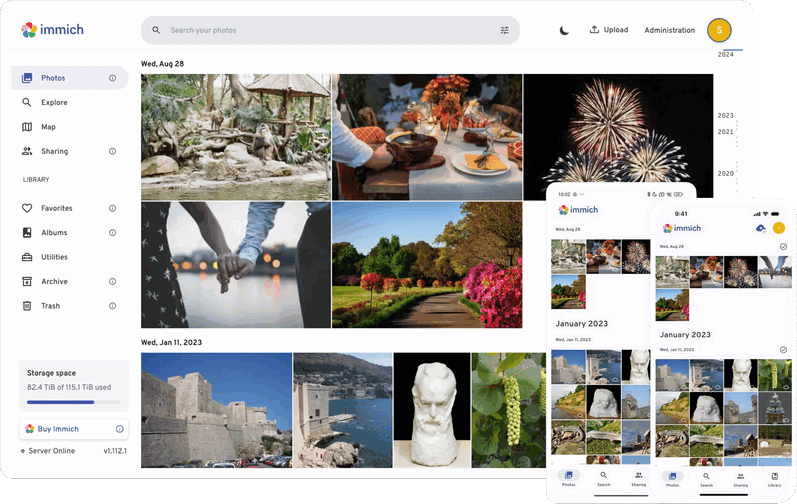
 Versie 3.2.0 van Immich is uitgekomen. Immich is een open source oplossing voor het opslaan en beheren van foto's en video's. Het draait in Docker, waardoor je alles in eigen hand hebt en niet afhankelijk bent van een derde partij. Het wordt door velen als een serieuze concurrent van Google Photos en Apple Photos beschouwd. De media kan via een webbrowser worden benaderd en er zijn ook apps voor Android en iOS. Een demo van Immich is hier te vinden. In deze uitgave zijn de volgende veranderingen en verbeteringen aangebracht:
HighlightsDocker compose builder
- Docker compose builder
- Revamped search UI (web)
- Search API v2 (server)
- View own people in shared assets, cross-user clustering
- Workflow tags trigger and actions
- Dedicated memories page
- Tag renaming (web)
- View assets in map viewport (web)
We recently released our new docker compose builder, which lets you put together a custom compose file for Immich more easily. Please try it out and give us your feedback!
Search API v2 (server)We have built an entirely new search API that, amongst other things, will support searching within albums and combining multiple search filters with both AND and OR operations. Some of these features will be exposed to the search UI interfaces in the future, others will be used to power other fancy features as well as give 3rd party tools more functionality. If you are interested in the particular changes and examples for how to use the new API, feel free to check out the PR #30179 as well as our API documentation.
Revamped search UI (web)We have a new designer who helped us remodel the search modal, which has been pretty complex before and looks a lot more visually appealing in our opinion now. It still supports the same functionality, but with some quality of life additions as well as a significantly simpler look. In the future, we will extend this to also include some of the new features enabled by the new search API. Stay tuned and give us your feedback on the new design!
View own people in shared assetsWe are very happy to ship the first step towards better sharing. You can now have people recognized across trusted users, which also allows you to view people you already have records of in any shared assets! In the user sharing settings there is a new section; cluster group.
You can invite users on your instance that you trust to your own group, or join another group you have been invited to. These cluster groups make it possible to identify people in assets shared by users in the same group. They also likely improve accuracy, as the clustering will operate on a bigger pool of faces. People names and birth dates are still set on a per-user level and aren’t (yet) shared with users in the same group.
As of now, this requires resetting facial recognition for all users in the group, in order for the changes to apply retroactively for all assets. This means, names and birth dates will be lost, and the results can vary slightly compared to before. Only faces recognized by machine learning will be affected by this. We may be able to do some non-destructive merging in the future, but for now this is a necessary step in order to fully benefit from the feature. That is why we put a button in the sharing settings for every user in the group (specifically also non-admins) to reset the facial recognition for that group.
Workflow tags trigger and actionsWorkflows have gotten a new trigger. You can now do automations when an asset has been tagged. In order to use this new trigger, there is also a new filter that allows you to match specific tags. It supports matching for all, any, or none in the provided list. Lastly, a new workflow action to add tags to the current asset has also been added. It allows to add a list of tags at once.
Dedicated memories pageThe new memories page allows you to view past memories. You can also favorite memories and they will show up here and never get deleted. The goal is for this to be a place you can come back to at any point and reminisce in old memories.
Tag renaming (web)Finally, you can also rename existing tags. This is a small addition to the edit tag modal on web, but under the hood was more complicated than you might expect.
View assets in map viewport (web)Similarly to showing a timeline all assets in a cluster on the map when clicking on it, you can now open a timeline for assets currently in the viewport. There is a new button among the map controls to show assets in the area. It will open a timeline that will update as you pan around the map.
| Versienummer | 3.2.0 |
| Releasestatus | Final |
| Besturingssystemen | Android, iOS, Platformonafhankelijk |
| Website | Immich |
| Download | https://immich.app |
| Licentietype | Open source/betaald |

Door Bart van Klaveren
Downloads en Best Buy Guide
Feedback • 10-09-2026 20:0037 • submitter: Lohengrin
Update-historie
| 15-09 | Immich 3.2.1 | 35 |
| 10-09 | Immich 3.2.0 | 37 |
| 29-07 | Immich 3.1.0 | 54 |
| 03-07 | Immich 3.0.0 | 24 |
| 11-04 | Immich 2.7.4 | 30 |
| 07-04 | Immich 2.7.2 | 11 |
| 25-03 | Immich 2.6.2 | 51 |
| 19-03 | Immich 2.6.1 | 35 |
| 11-02 | Immich 2.5.6 | 35 |
| 04-02 | Immich 2.5.3 | 68 |
Lees meer
:strip_exif()/i/2007505872.png?f=thumbmedium)
Reacties (37)
[Reactie gewijzigd door bokalmevissen op 11 september 2026 00:50]
Ik ben niet bang voor de processing maar het retaggen van gezichten en namen etc toekennen is een flinke klus..
Voor mij een goede reden om de reset niet uit te voeren, want ik weet dat mijn moet hier wel wat tijd aan heeft besteed en dit regelmatig gebruikt.
:strip_exif()/u/609320/crop5b6ae539e2dcd_cropped.gif?f=community)
:strip_exif()/u/2393/Tie-Fighter-Pilot3.gif?f=community)
In de sharing settings heb ik dus nog geen groep - ik zie wel de knop "reset facial data" - Moet ik nu sowieso facial data opnieuw genereren of geldt dat alleen als je al een groep hebt? Het is toch even werk, als het nodig is prima dan die ik het liever nu alvast maar als het niet nodig is dan scheelt het toch flink werk
/u/317385/crop5de254a3e0024_cropped.png?f=community)
 Enige wat ik dan weer lastig vindt is 'Right now if another user joins a group you should re-run everything again'. Dat betekent dat ik idealiter al een account voor de kinderen maak dan alles reset en een re-run doe, anders blijf je bezig als je iemand toevoegt in de group.
Voordien kon je je bibliotheek delen met een andere gebruiker. De gedeelde foto's waren dan wel zichtbaar voor die gebruiker, maar de facial data en face clustering waren niet tussen gebruikers gedeeld. Een persoon die bij de ene gebruiker was herkend, werd dus niet automatisch als dezelfde persoon herkend in de foto's van de andere gebruiker.
Met de nieuwe functie “View own people in shared assets” en het aanmaken van een cluster group kunnen gebruikers hun face clustering gezamenlijk gebruiken. Personen binnen de cluster group kunnen daardoor ook worden herkend in gedeelde foto's van de andere gebruikers.
Om dit ook toe te passen op bestaande foto's, is het noodzakelijk om de facial recognition te resetten.
/u/1782830/crop66a77ec6a31d2_cropped.png?f=community)
:strip_icc():strip_exif()/u/219282/crop65bfaacd66e4c_cropped.jpg?f=community)
Met een aanpassing van
- ./library:/data
naar
- ${UPLOAD_LOCATION}:/data
Werkt alles weer.
[Reactie gewijzigd door xxs op 10 september 2026 20:50]
Ik was gisteren kennelijk niet scherp. ;-)
[Reactie gewijzigd door MuizUnattended op 11 september 2026 15:49]
Maar de onoplettendheid zat bij mezelf.
:strip_exif()/u/120134/Cucco.gif?f=community)
Misschien al langer, al gebruik ik zelf geen environment variabelen nog en heb ik liever directe mappings in mijn compose files. Smaak wellicht, ik ben ook geen expert.
Nogal, niet alleen verouderd, maar ook onveilig composes. Ik gebruikte het in het verleden, toen ik nog Synology nas had en kort met UGREEN, maar ben per direct gestopt nadat ik hier achterkwam. Vaak wordt er ook geen gebruik gemaakt van .env.Vele zogenaamde "guide" sites hanteren sterk verouderde composes. Zoals o.a die van Marius. Evenals de .ENV settings.
Sommige, zoals https://drfrankenstein.co.uk/ geven wel netjes aan, let op: verouderd/niet onderhouden.
Gewoon rechtstreeks vanuit git of website de compose (en .env) gebruiken.
vanaf de site,
En ja dat wel, maar voor vele is dat niet zo simpel.
Dan is Immich bekend en betrouwbaar, maar inderdaad laat alles via root lopen (of via zelfde ID), neemt het risico toe. Ik zelf ben niet een docker expert, verre van, maar dit staat haaks op wat bijvoorbeeld Proxmox (eerder) aanraad: Geisoleerd en in VM, in combinatie met deze best practices: https://www.linuxserver.io/blog/docker-security-practices + docker composes (en hun best practices) vanuit de bron. Dus ook niet met helper scripts, die ook vanalles uitvoert, op rootniveau. Al worden deze scripts wel geevalueerd, maar toch.
Truenas heeft standaard ID 568, beetje zoals dr frankenstein aanraad. Unraid ben ik na nog geen dag mee gestopt. Geen MFA, alleen een root accounts als default, maar wel dockers met het zelfde root-account? Plus 250,- vragen? Dacht het even niet.
Laat ik toevalig afgelopen weken hierin verdiept hebben, haha, maar hoe meer gemak + meer risico's, is me opgevallen. Van nas-ossen en docker-configuraties.
Erg leuk zo'n builder maar voor custom locations is een chatbot 10x handiger en sneller.
/u/151149/crop5fde11d32f663_cropped.png?f=community)
:strip_icc():strip_exif()/u/52016/Alfa-TiMo-square-60.jpg?f=community)
Ik neem aan dat @bokalmevissen een reset heeft uitgevoerd na het samenvoegen (Hier een N350, dus zal wat sneller gaan. app en DB op NVMe, foto's op HDD).
Kan ik het account van mijn vrouw toevoegen in de zelfde "Cluster group" en/of als "Partner"?
Stel: momenteel heb ik 100 foto's waar mijn gezicht op staat en gedetecteerd door ML en 200 foto's van mijn vrouw. Mijn vrouw heeft vervolgens 300 foto's met mijn gezicht en 400 foto's van haar gezicht.
Daarnaast hebben we ook beiden foto's van kind1 en kind2 en ook andere gezichten. De kinderen hebben geen account. Kan dit gedeeld worden?
Voor zover ik weet, zit een gezicht niet gekoppeld aan een account. Wat deel ik binnen een cluster group of met een parter?
[Reactie gewijzigd door timovd op 11 september 2026 10:56]
/u/263454/crop69528a83920d8.png?f=community)
Om te kunnen reageren moet je ingelogd zijn