Software-update - LocalSend 1.18.0
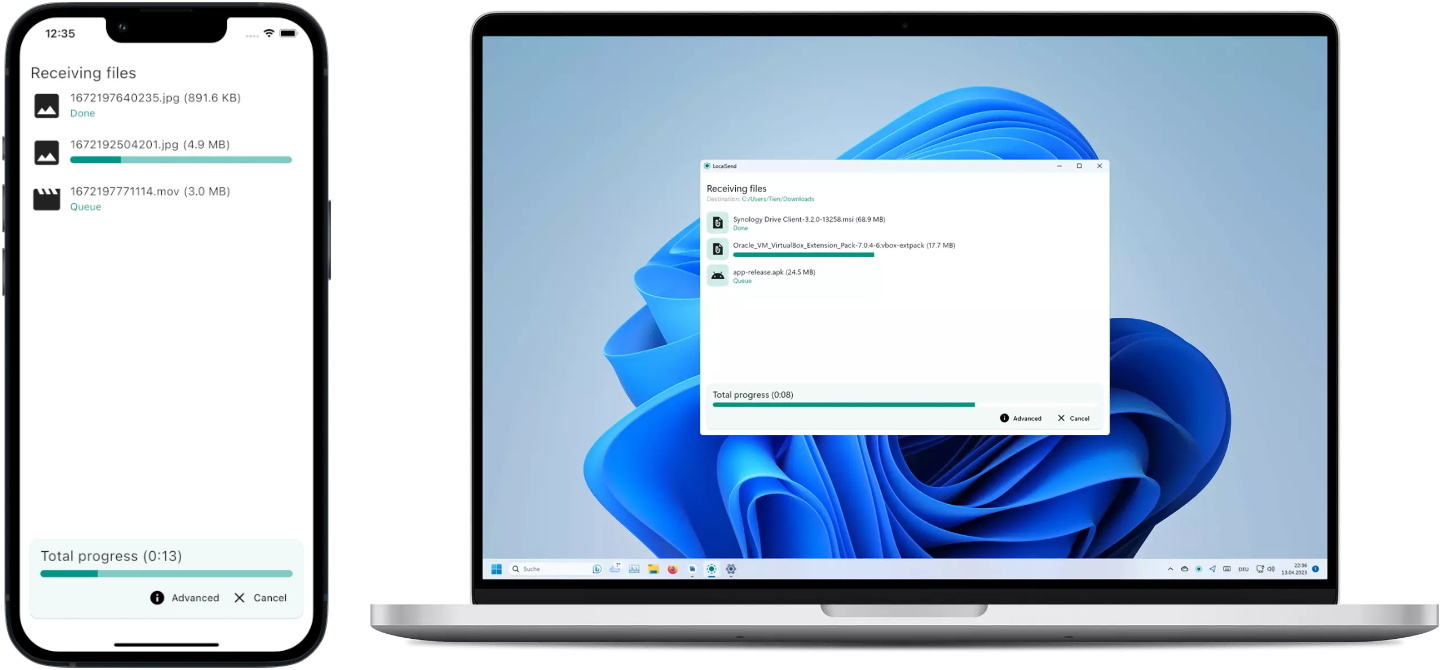
 LocalSend is een programma waarmee bestanden en berichten kunnen worden uitgewisseld tussen apparaten op een lokaal netwerk. Het is bijvoorbeeld ideaal om foto's van een telefoon naar de computer te zenden. LocalSend is opensource en beschikbaar voor Windows, macOS, Linux, Android en iOS, al is de download voor Windows nog niet beschikbaar. Versie 1.18.0 is uitgekomen met kort erachteraan 1.18.1 en de changelog daarvan kan hieronder worden gevonden.
LocalSend 1.18.1
Android+iOS only hotfix update.
- fix: revert button icon sizes to 24
- fix: when sending a message that is accepted immediately, a ghost device list tile appears
- fix(mobile): when sending a link message, the "Open" button overflows
- fix(android): add missing ACCESS_LOCAL_NETWORK permission that is required for Android 17+
- i18n: add Belarusian and Irish
LocalSend 1.18.0
This release is also the first release of the CLI. It uses the same Rust library as the Flutter app. The Rust rewrite of the core networking and file I/O logic is complete. You should notice that in improved transfer speeds. Please note that the Windows EXE installer is not published (#3270). It will be added in a few days (hopefully).
Summary
- feat(cli): initial CLI release
- feat: receive via link
- feat: custom color theme via color picker
- feat: ipv6 support
- feat: checksum support (enabled by default)
- feat: automatically accept files by favorite devices by default
- feat: use decimal units for file sizes (1 GB = 1000 MB) to match macOS, iOS, Android, and Linux
- feat: enable starting text share via command line using
--textor-tflags- feat: improve remaining time formatting for long transfers
- feat: change duplicate file naming from "file-1.txt" to "file (1).txt" format
- feat(android, ios, macos): respect system-wide animation preferences on first app startup
- feat(android): run file transfer in background
- feat(android): add quick settings tile for instant app launch
- feat(windows): add LocalSend to share sheet
- feat(macos): implement button to quickly open firewall settings from troubleshoot page
- feat(macos): add Command+Comma shortcut to open settings
- feat(macos): use user-friendly ComputerName instead of the technical hostname
- feat(macos): enable Dock icon text-drop even when the app is not running
- feat(linux): use native window decorations instead of large GTK3 headerbar
- perf: faster transfers for slow receiving devices
- fix: receiving / sending many files no longer freeze / lag
- fix: release wake lock after file transfer completes to allow device sleep
- fix: text message content displayed three times in history dialog
- fix: text message content size calculation
- fix: save DNG files to image gallery
- fix(ios, android): prevent transfer error by saving unsupported media formats to folder instead of gallery
- fix(android): share to LocalSend sometimes doesn't work
- fix(android): preserve location metadata when sharing media
- fix(macos): prevent Dock icon from briefly appearing during autostart when "Start hidden" is enabled
- fix(macos): Dock icon drag-and-drop and Share Extension working again
- fix(linux): add CJK font support for Chinese, Japanese, and Korean text
| Versienummer | 1.18.0 |
| Releasestatus | Final |
| Besturingssystemen | Android, Linux, macOS, iOS, Windows 10, Windows 11 |
| Website | LocalSend |
| Download | https://github.com/localsend/localsend?tab=readme-ov-file#download |
| Licentietype | GPL |

Door Bart van Klaveren
Downloads en Best Buy Guide
Feedback • 11-08-2026 09:0017 • submitter: danmark_ori
Update-historie
| 11-08 | LocalSend 1.18.1 | 17 |
| 02-'25 | LocalSend 1.17.0 | 26 |
| 11-'24 | LocalSend 1.16.1 | 37 |
Lees meer
:fill(white):strip_exif()/i/2007031380.jpeg?f=thumbmedium)
Reacties (17)
:strip_icc():strip_exif()/u/225970/crop67b73bd667724_cropped.jpg?f=community)
Kan ik dit zeer handige programma dan ook niet meer gebruiken?
:strip_icc():strip_exif()/u/856937/crop5f2131f40f511_cropped.jpeg?f=community)
Daarnaast, je kunt gewoon zelf een Wifi netwerk opzetten zonder Internet, dan kunnen je devices alsnog lokaal met elkaar communiceren. Daar heb je alleen een Access Point voor nodig. Dat er geen Internet is wil niet zeggen dat je dan geen Wifi kunt gebruiken.
En over de LocalSend tool: Het lijkt er op dat LocalSend niet gebruik maakt van het Internet voor iets, dus je zou de tool gewoon lokaal moeten kunnen blijven gebruiken.
En heb je een telefoon met Internet toegang via een data bundel, dan kun je die gebruiken als je toch iets met het Internet wilt doen. Zet dan de LocalSend App op je telefoon. Of gebruik je telefoon tijdelijk om een 'HotSpot' te maken, zodat je apparaten thuis tijdelijk via je telefoon op het Internet kunnen.
Voor het gemak ga ik er van uit dat je voor het lezen van tweakers.net nog wel een mobiel internet hebt. Dan zijn er nog vele manieren om toch een wifi netwerk te hebben:
Je kan op 1 van je toestellen een persoonlijke-hotspot aan zetten. Dan heb je daar alsnog je wifi. De rest van je toestellen kan je daar dan op aansluiten en zo dit soort tools alsnog gebruiken.
Ook kan je een router-met-wifi aanschaffen die gebruik maakt van een mobiel netwerk of eventueel zelfs van je wifi-hotspot. Dan heb je thuis gewoon wifi maar kan je daar langs mogelijk niet internetten.
/u/34186/crop62e07d174532d_cropped.png?f=community)
Je kunt wel gewoon WiFi houden/leggen, alleen heb je dan geen gateway (en dus geen internet). Maar je apparaten kunnen dan wel met elkaar communiceren.Dus ook geen WiFi.
[Reactie gewijzigd door Room42 op 11 augustus 2026 13:06]
/u/263454/crop69528a83920d8.png?f=community)
:strip_icc():strip_exif()/u/279592/crop561258ca2dd6e_cropped.jpeg?f=community)
Je moet alleen het ip even checken van je devices
Je kunt ook eventueel PairDrop gebruiken voor bestanden lokaal tussen PC's te kopiëren via een web interface.
Werkt bij mij flawless van IOS safarie naar windows firefox.
/u/268967/crop5e8a0fac1d139.png?f=community)
Ook beschikbaar via f-Droid.
In deze dagen kom je niet veel programma's meer tegen die nog exclusief, oldskool via LAN werken (en dus niet via een cloud werken / online account vereisen) .
[Reactie gewijzigd door Christian1989 op 11 augustus 2026 10:37]
Om te kunnen reageren moet je ingelogd zijn